

Dashboard
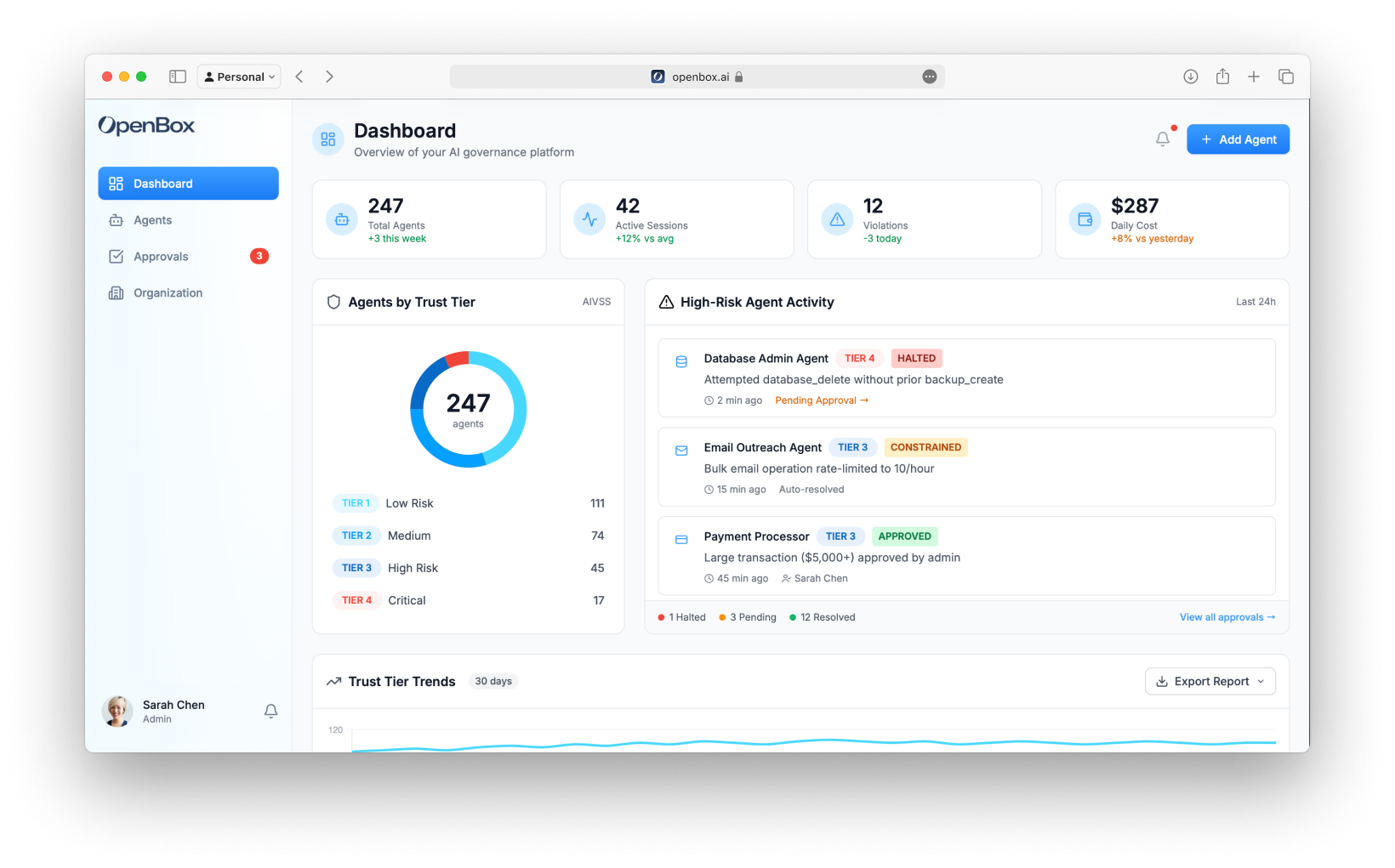
The Dashboard provides a real-time overview of your organization's AI governance health. Access it from the sidebar by clicking Dashboard.
Navigation
The sidebar navigation includes:
- Dashboard - Organization overview (this page)
- Agents - Manage and monitor agents
- Projects - Repository-to-runtime lineage for governed agents
- Approvals - Human-in-the-loop queue (shows pending count badge)
- Organization - Teams, members, API keys, settings
Hero Stats
The top of the dashboard displays four key performance indicators:
| Metric | Description |
|---|---|
| Total Agents | Number of registered agents with weekly change |
| Active Sessions | Currently running workflow sessions |
| Violations | Policy violations in the selected time period |
| Daily Cost | Estimated daily token/API usage costs |
Agents by Trust Tier
A donut chart showing the distribution of agents across Trust Tiers:
| Tier | Trust Score | Description |
|---|---|---|
| Tier 1: Trusted - Green | 90 – 100 | Highly trusted, minimal constraints |
| Tier 2: Confident - Blue | 75 – 89 | Standard policies, normal monitoring |
| Tier 3: Monitor - Orange | 50 – 74 | Enhanced controls, some HITL required |
| Tier 4: Restrict - Red | 25 – 49 | Strict governance, frequent HITL |
| Untrusted: Decommission - Dark Red | 0 – 24 | Agent suspended, cannot operate |
Click any tier in the legend to filter the agents list.
High-Risk Agent Activity
A timeline of recent governance events from Tier 3 and Tier 4 agents:
Each activity shows:
- Agent name and icon
- Trust Tier badge (TIER 3, TIER 4)
- Verdict badge (ALLOWED, HALTED, APPROVED)
- Description of what triggered the governance event
- Timestamp
- Link to approvals (if pending)
Example events:
- "Attempted database_delete without prior backup_create" → HALTED
- "Large transaction ($5,000+) approved by admin" → APPROVED
Trust Tier Trends
A 30-day line chart showing how your trust tier distribution has changed over time. Use this to identify:
- Improving governance (more agents moving to Tier 1/2)
- Emerging risks (agents moving to Tier 3/4)
- Seasonal patterns in agent behavior
Export Reports
Click Export Report to download:
- CSV - Raw data for analysis
- PDF - Formatted report for stakeholders
Adding Agents
Click the Add Agent button (top right) to register a new agent.
The agent creation form includes:
- Teams and Icon selection
- API Key Generation (copy once)
- Initial Risk Assessment (Risk Profile)
- Attestation (Execution Evidence)
See Registering Agents for a field-by-field walkthrough.
Next Steps
From the Dashboard, you'll typically:
- View Agents - Click an agent to see its details and configure trust controls
- Review Projects - Connect repositories and inspect agent lineage across code, runtime, sessions, and governance snapshots
- Handle Approvals - Review pending HITL requests when the badge shows pending items
- Add a New Agent - Register another agent to bring under the trust layer